Keyless
Kill all script
 Romal3m607 3 days ago 219 views 1
Run it
Copy the script and paste it into your executor.
Kill all script.lua · 170 lines
 Players = :()
 LocalPlayer = Players.LocalPlayer
 CoreGui = :()


  ()
     PlayerName = LocalPlayer.Name
     MessageGui = .()
    MessageGui.Name =
    MessageGui.Parent = CoreGui

     TextLabel = .()
    TextLabel.Size = .(, , , )
    TextLabel.Position = .(, -, , )
    TextLabel.BackgroundColor3 = .(, , )
    TextLabel.BackgroundTransparency =
    TextLabel.TextColor3 = .(, , )
    TextLabel.Text =  .. PlayerName ..
    TextLabel.Font = .Font.SourceSansBold
    TextLabel.TextSize =
    TextLabel.Parent = MessageGui


    .(, ()
         MessageGui  MessageGui:()
    )


()


 ScreenGui = .()
ScreenGui.Name =
ScreenGui.ResetOnSpawn =
ScreenGui.Parent = CoreGui

 MainFrame = .()
MainFrame.Size = .(, , , )
MainFrame.Position = .(, , , )
MainFrame.BackgroundColor3 = .(, , )
MainFrame.BorderSizePixel =
MainFrame.Active =
MainFrame.Draggable =
MainFrame.Parent = ScreenGui

 Title = .()
Title.Size = .(, , , )
Title.BackgroundColor3 = .(, , )
Title.TextColor3 = .(, , )
Title.Text =
Title.Font = .Font.SourceSansBold
Title.TextSize =
Title.Parent = MainFrame

 ToggleButton = .()
ToggleButton.Size = .(, -, , )
ToggleButton.Position = .(, , , )
ToggleButton.BackgroundColor3 = .(, , )
ToggleButton.TextColor3 = .(, , )
ToggleButton.Text =
ToggleButton.Font = .Font.SourceSansBold
ToggleButton.TextSize =
ToggleButton.Parent = MainFrame

 ScrollingFrame = .()
ScrollingFrame.Size = .(, -, , -)
ScrollingFrame.Position = .(, , , )
ScrollingFrame.BackgroundTransparency =
ScrollingFrame.ScrollBarThickness =
ScrollingFrame.Parent = MainFrame

 UIListLayout = .()
UIListLayout.Padding = .(, )
UIListLayout.Parent = ScrollingFrame


 bringing =
 selectedPlayers = {}


ToggleButton.MouseButton1Click:(()
    bringing =  bringing
     bringing
        ToggleButton.Text =
        ToggleButton.BackgroundColor3 = .(, , )
        .(()
             bringing
                 lpChar = LocalPlayer.Character
                 lpChar  lpChar:()
                     player, isSelected  (selectedPlayers)
                         isSelected  player.Character  player.Character:()
                            player.Character.HumanoidRootPart.CFrame = lpChar.HumanoidRootPart.CFrame * .(, , -)


                .()

        )

        ToggleButton.Text =
        ToggleButton.BackgroundColor3 = .(, , )

)


  (player)
     player == LocalPlayer

     PlayerFrame = .()
    PlayerFrame.Size = .(, , , )
    PlayerFrame.BackgroundColor3 = .(, , )
    PlayerFrame.Parent = ScrollingFrame

     NameLabel = .()
    NameLabel.Size = .(, , , )
    NameLabel.BackgroundTransparency =
    NameLabel.TextColor3 = .(, , )
    NameLabel.Text = player.Name
    NameLabel.TextXAlignment = .TextXAlignment.Left
    NameLabel.Font = .Font.SourceSans
    NameLabel.TextSize =
    NameLabel.Parent = PlayerFrame

     SelectButton = .()
    SelectButton.Size = .(, -, , -)
    SelectButton.Position = .(, , , )
    SelectButton.TextColor3 = .(, , )
    SelectButton.Font = .Font.SourceSansBold
    SelectButton.TextSize =
    SelectButton.Parent = PlayerFrame


      ()
         selectedPlayers[player]
            SelectButton.Text =
            SelectButton.BackgroundColor3 = .(, , )

            SelectButton.Text =
            SelectButton.BackgroundColor3 = .(, , )


    selectedPlayers[player] =
    ()


    SelectButton.MouseButton1Click:(()
        selectedPlayers[player] =  selectedPlayers[player]
        ()
    )


    player.AncestryChanged:(()
          player:(Players)
            PlayerFrame:()
            selectedPlayers[player] =

    )


 _, player  (Players:())
    (player)


Players.PlayerAdded:((player)
    (player)
)About this script
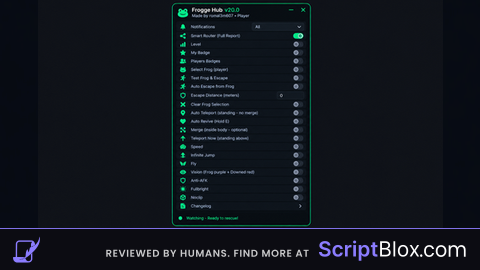
Kill all frogge Do you want to kill everyone? This script does whatever you want and choose the players and kill them. How to use the script: First of all you choose the players you want to kill and only hit and the people you chose fall Own:romal Username :romal3m607